This piece made my jaw drop. Check it out.


8/18/07


Class 2 - Session 207
This week I had a lot to do - after class, I understood my blocking was incorrect.
The human body cannot bend in a cartoony way like I did in my blocking (by breaking the upper part of the torso).
I also finally managed to fix the counterbalance issue I didn't manage to fix since moving out of blocking plus.
This week was the final spline mode and moving into our last assignment for the semester - I've chose to have "push/pull a heavy object".
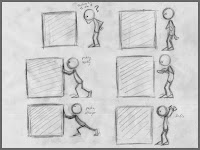
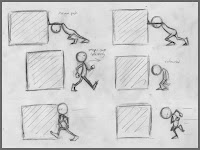
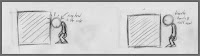
The human body cannot bend in a cartoony way like I did in my blocking (by breaking the upper part of the torso).
I also finally managed to fix the counterbalance issue I didn't manage to fix since moving out of blocking plus.
This week was the final spline mode and moving into our last assignment for the semester - I've chose to have "push/pull a heavy object".


8/12/07
A Short film By Mario Pochat - Marcelino and Bartolomeo
Here's a little short film I've found.
The guy who made it is a former AM student - hope you'll like it:
http://www.mariopochat.com/Anim-pages/myb.htm
The guy who made it is a former AM student - hope you'll like it:
http://www.mariopochat.com/Anim-pages/myb.htm
8/11/07
Making your own shot mask (frame counter)
First of all, I would like to personally thank a friend from AM who send me this - Tobias Von Burkersroda, for making a great effort to bring this tutorial to life, and for letting me post it here.
1. Create a Shot Mask in an empty file
2. Create Text ( Create --> Text Options)
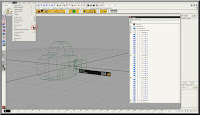
3. Write '0123456789'
4. Select Poly
5. Click on the Arrow ans select your favorite text type
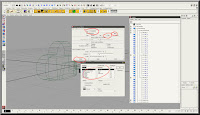
6. Select the created poly numbers
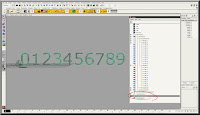
7. Delete the history (Edit --> Delete by Type --> History)
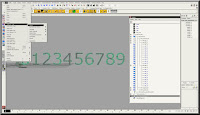
8.Delete the created curves
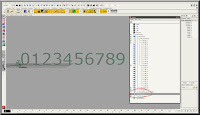
9. Select all numbers and center the pivot ( Modify --> Center Pivot)
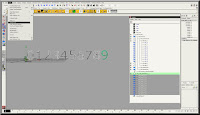
10. Create a Locator
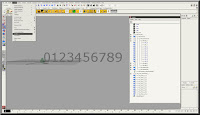
11. Snap all numbers to the Locator
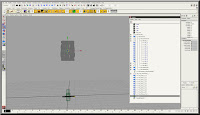
12. Rename the numbers the same way like the numbers of the original Shot Mask
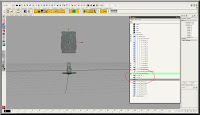
13. Pose them where you want them to be
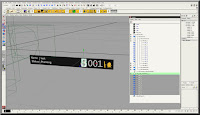
14. Delete the original Shot Mask number
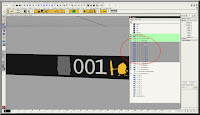
15. In the outliner move the numbers to the group where the original numbers had been.
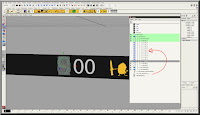
16. Move the time Slider. First of three parts done :)
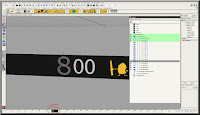
17. Delete the 'AM:digit_2' and 'AM:digit_3'
18. Duplicate 'AM:digit_1' two times and rename the copies to AM:digit_2' and 'AM:digit_3
19. move all the 3 AM:digit_x groups
20. If you have crated a cam, delete it and save the file
21. Go to your scene and import the frame counter and parent it under your Shot Cam
22. DONE ;)
1. Create a Shot Mask in an empty file
2. Create Text ( Create --> Text Options)

3. Write '0123456789'
4. Select Poly
5. Click on the Arrow ans select your favorite text type

6. Select the created poly numbers

7. Delete the history (Edit --> Delete by Type --> History)

8.Delete the created curves

9. Select all numbers and center the pivot ( Modify --> Center Pivot)

10. Create a Locator

11. Snap all numbers to the Locator

12. Rename the numbers the same way like the numbers of the original Shot Mask

13. Pose them where you want them to be

14. Delete the original Shot Mask number

15. In the outliner move the numbers to the group where the original numbers had been.

16. Move the time Slider. First of three parts done :)

17. Delete the 'AM:digit_2' and 'AM:digit_3'
18. Duplicate 'AM:digit_1' two times and rename the copies to AM:digit_2' and 'AM:digit_3
19. move all the 3 AM:digit_x groups
20. If you have crated a cam, delete it and save the file
21. Go to your scene and import the frame counter and parent it under your Shot Cam
22. DONE ;)
Class 2 - Session 206
This week we had to finish the blocking plus.
We had a very interesting lecture by Wayne Gilbert, the author of the book ANAMIE - Simplified drawing for Planning Animation.
Wayne explained about weight, external and internal forces and the right way to move and give your character the right personality.
Here's a link to Wayne's book:
http://www.anamie.com/
We had a very interesting lecture by Wayne Gilbert, the author of the book ANAMIE - Simplified drawing for Planning Animation.
Wayne explained about weight, external and internal forces and the right way to move and give your character the right personality.
Here's a link to Wayne's book:
http://www.anamie.com/
8/9/07
Class 2 - Session 205
This week is all about the blocking - make it with a good planning of poses, timing, and make it in stepped mode (like the beginning of the 180 degrees turn).
Subscribe to:
Posts (Atom)